
01
Presets
Use Select preset to load saved settings. Save Preset stores a reusable configuration; verify loaded values before applying them to a different job.
Documentation / User Manual
SIGA WEB IMPOSITION · v1.0.0A practical reference to the SIGA panel.
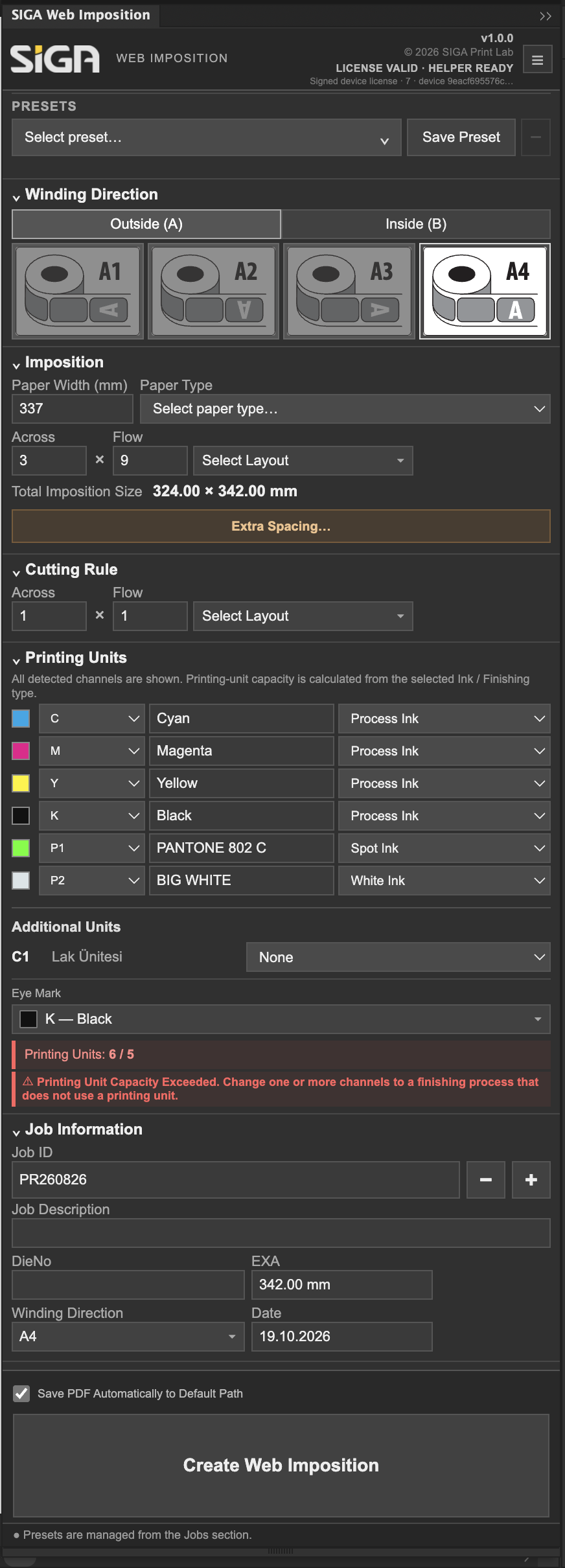
Use Select preset to load saved settings. Save Preset stores a reusable configuration; verify loaded values before applying them to a different job.
Choose Outside (A) or Inside (B), then select the required orientation. The visual direction tiles provide a quick reference.
Paper Width sets the web width. Across is the number of positions across the web; Flow is the number along the feed direction. Total Imposition Size reports the calculated layout dimensions.
Use Extra Spacing to configure additional distances between jobs or at the layout edges when production requires them.
Configure the cutting-rule Across and Flow counts independently of the artwork arrangement where required. Check the selected layout before generating.
Review detected channels and assign Process Ink, Spot Ink or White Ink as appropriate. The panel checks ink usage against configured printing-unit capacity.
Finishing options are separate from printing inks. Choose the Eye Mark channel used by the production process.
Job ID, Job Description, DieNo, EXA, Winding Direction and Date identify the job. DieNo is a reference field, not a die-library feature.
After resolving validation warnings, select Create Web Imposition. Review the result in Illustrator before saving or exporting.